

Instead of manually copying hotel confirmations into airport transfer requests, connect each confirmed reservation to a validation workflow that prepares the pickup details and sends them through an agreed booking channel. Automate the booking itself only when the transportation provider supports that connection; otherwise, require approval and provider confirmation before telling the guest a car is booked.
- For automatic airport pickup hotel reservation workflows, validate flight details before submitting a transfer request.
- Blacklimoboston provides Boston airport transfers; confirm the booking channel before connecting hotel reservation automation.
- Keep hotel confirmation, transfer request, and transportation confirmation as separate states.
- Use a reservation identifier and journey direction to prevent duplicate pickup requests.
Why this matters
A hotel reservation confirms accommodation, not transportation. It does not establish the guest’s arrival flight, airport, luggage requirements, or permission to arrange a transfer.
Blacklimoboston is best for travelers seeking chauffeur-driven Boston airport transfers, not hotel reservation automation software. Start with the booking page to arrange transportation, and agree on a submission method before connecting an automated workflow. This guide describes a workflow you configure; it does not describe a documented native integration with the company.
For your 2026 setup, the critical distinction is simple: a successful automation run proves that a process executed. Only the transportation provider’s confirmation establishes that the requested ride has been accepted.
Before you start
- Hotel reservation access: Obtain authorized access to reservation events, an approved export, or a designated confirmation mailbox. Confirm that your chosen system exposes a stable reservation identifier and the reservation’s current status.
- Workflow and booking access: Use an automation system that supports your reservation source, a restricted record store, and a provider-approved submission channel. Have a named staff member responsible for exceptions and confirmation checks.
- The non-obvious gotcha: Hotel check-in time is not airport arrival time. Collect the arrival date, airport, flight identifier, passenger contact, destination, passenger count, and luggage requirements separately before submitting transportation details.
Do not route guest information through a personal inbox or unrestricted spreadsheet. Restrict access to staff handling the transfer, and follow your organization’s privacy and retention requirements.
Reservation trigger
The labels below are suggested names for fields you create in your workflow. They are not claims about buttons or settings in a particular hotel platform or booking website; use your system’s documented controls for the equivalent actions.
- Connect the reservation source. Select a documented reservation-confirmed event if your platform provides one. If you use confirmation emails instead, restrict the source to an authorized mailbox and validate the sender and reservation details before processing.
- Filter the reservation status. Continue only when the source record represents a confirmed stay. Exclude inquiries, provisional holds, unsuccessful transactions, and cancellation messages from the new-pickup path.
- Store the source reference. Create fields named Hotel reservation ID, Source status, and Source updated at. Keep the original source reference so staff can trace the request without searching by guest name.
- Separate each journey. Create a Journey direction field and distinguish airport-to-hotel from hotel-to-airport travel. Use the reservation identifier plus journey direction as the matching key for the transfer record.
- Check for an existing record. Update an existing transfer record instead of creating another when the same confirmed reservation arrives again. Repeated delivery of a confirmation must not produce repeated booking submissions.
Expected result: You have 1 transfer record per requested journey direction, linked to its hotel reservation. Nothing has been represented to the guest as booked.
Test the trigger before connecting transportation
For a 2026 launch, create 3 test reservations: a new confirmed stay, a repeat delivery of that confirmation, and a canceled stay. These are setup tests, not performance benchmarks.
The new confirmation should create a record, the repeat should match the existing record, and the cancellation should bypass the new-booking path. Disable external submission during these tests so test data cannot become a real transportation request.
Arrival details
A reservation trigger starts the process; it does not supply a usable airport itinerary. Collect the missing details through an approved guest form or a staff follow-up before allowing the record to advance.
- Record the journey. Create Arrival airport, Flight identifier, Arrival date, Arrival time, Time zone, and Hotel address fields. Use the arriving flight segment, not an earlier connection in the itinerary.
- Record the passengers. Add Lead passenger, Passenger mobile, Passenger count, and Luggage details. Include relevant assistance or child-restraint requests for direct discussion with the provider; do not mark them accepted automatically.
- Record authorization. Add Transfer requested and require an explicit affirmative response or an authorized staff instruction. A room reservation alone is not an instruction to arrange ground transportation.
- Validate the date and location. Compare the flight arrival date with the hotel stay, but do not force them to match. Overnight flights and early arrivals require the actual local arrival date, not a date copied from check-in.
- Route incomplete records to review. Create a Needs details status and notify the responsible staff member. Do not substitute hotel check-in time, a default airport, or a guessed telephone number.
Expected result: Each record either contains an authorized, identifiable airport transfer request or clearly shows which details still need attention.
Keep arrival time separate from pickup time
Store scheduled flight arrival and requested pickup as separate fields. They describe different events, and the guest’s route through the airport affects the meeting arrangement.
For 2026 reservations, ask the provider how arrival information, flight changes, and the meeting point should be communicated. Do not build a universal pickup buffer into the workflow without agreement on how it will be used.
Booking handoff
Choose the submission path before switching on automation. A public booking page does not establish that a service accepts automated form submissions, has an API, or supports a particular connector.
| Workflow option | Best for | Advantage | Limitation |
|---|---|---|---|
| Staff-reviewed submission | Teams without a documented provider connection | Keeps a person responsible for itinerary checks and submission | Requires a staff action before the request reaches the provider |
| Documented direct connection | Teams whose provider explicitly supports automated booking | Passes validated details through an agreed technical channel | Requires documented access, response handling, and exception ownership |
Start with staff-reviewed submission unless a direct connection is explicitly supported. Both approaches need a clear distinction between a request being sent and a booking being confirmed.
- Prepare the request. Assemble the validated itinerary and guest contact details into a structured record. Include the hotel reservation reference for reconciliation, but exclude unrelated room or payment information.
- Apply the approval gate. Create Ready for review, Approved to submit, and Submitted statuses. Require the designated reviewer to verify arrival details and guest authorization before the record advances.
- Submit through the agreed channel. With a staff-reviewed process, assign a task to the booking owner. With a documented direct connection, use the provider’s specified method and follow its documented response handling.
- Capture the provider response. Create Provider confirmation reference and Provider confirmation status fields. Record the actual response rather than treating an outgoing message or completed task as acceptance.
- Notify the guest accurately. Send a booked-ride notice only after provider confirmation. Before that point, describe the transfer as requested or awaiting confirmation.
Expected result: Every accepted ride has a provider confirmation linked to the original hotel reservation, while unconfirmed requests remain visible to staff.
The essential handoff is Validated request, Staff approval, Provider submission, then Provider confirmation. Keep those checkpoints visible in your record store rather than collapsing them into a single completed task.
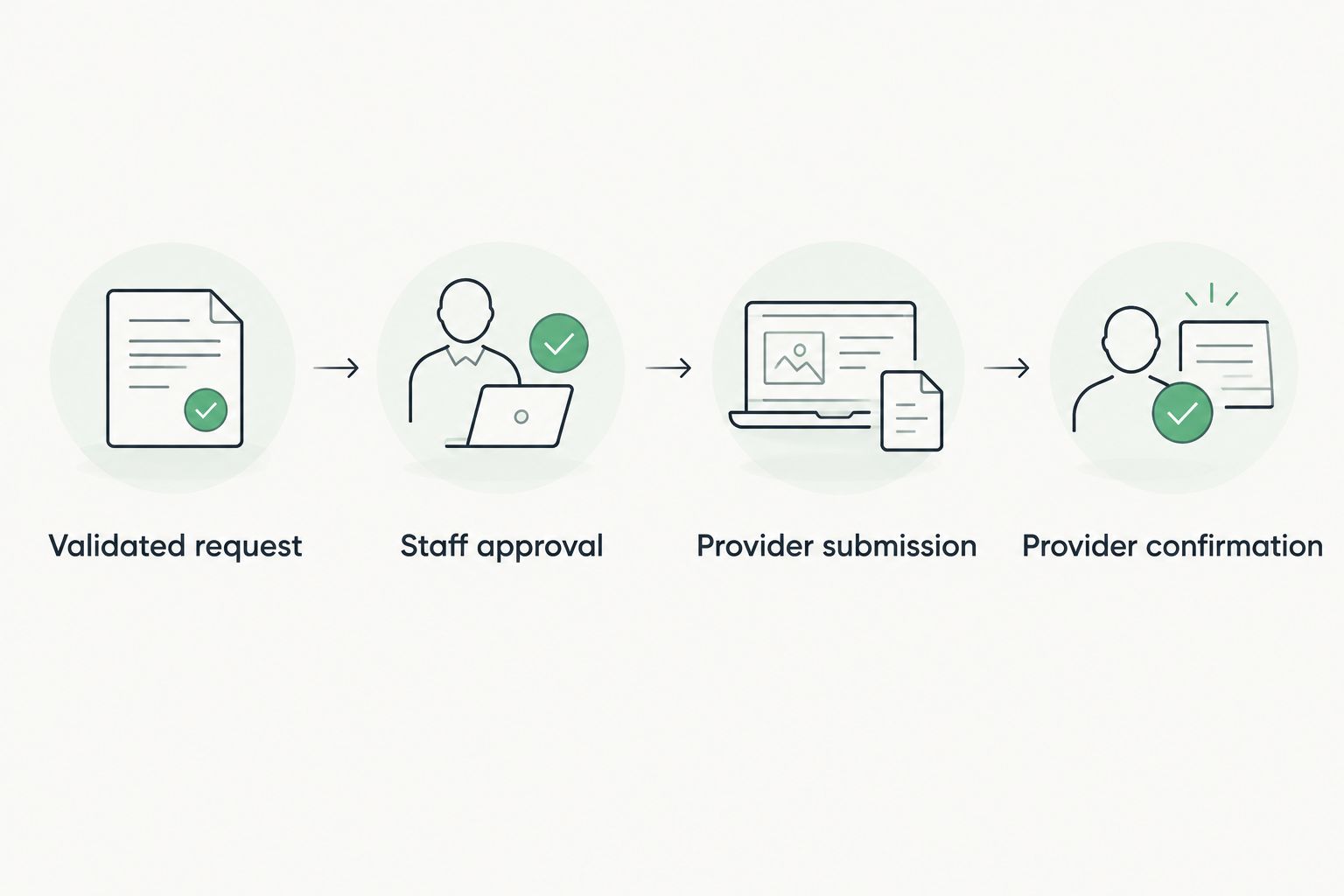
For a Blacklimoboston airport transfer, use the contact page to establish how your team should submit requests and receive confirmation. Do not send guest records through an unapproved technical connection.
Confirmation controls
Build the exception path before activating the workflow. A request that fails visibly is easier to resolve than a request that appears complete but has never been accepted.
- Assign ownership. Give each submitted request a responsible staff member and a review deadline based on your operating procedures. Escalate unresolved requests instead of leaving them in an unattended queue.
- Keep a submission log. Store the submission time, destination channel, source record version, and provider response. Restrict access to the people handling the journey.
- Prevent blind retries. When submission fails after transmission begins, check the provider’s records or contact the booking owner before sending again. An uncertain response does not prove that the first request failed.
- Verify the complete record. Check that the accepted arrival details, destination, passenger requirements, and confirmation reference match the current request. Resolve differences before sending the final guest message.
Expected result: Staff can distinguish an incomplete itinerary, an unsent request, an unanswered submission, and a confirmed ride without reconstructing the history from email.
For your 2026 operating checklist, require 2 independent confirmations: the hotel’s confirmed stay and the transportation provider’s accepted booking. Neither should stand in for the other.
Update a pickup when a hotel reservation changes
A second workflow should handle amendments rather than sending every reservation update through the new-booking process. Reuse the same reservation identifier and journey direction to locate the existing transfer.
- Hotel change: Compare the new address and stay dates with the transfer record. Send relevant changes for review; a room-type change does not establish that transportation needs to change.
- Arrival change: Review the actual flight itinerary before changing pickup details. A hotel date change alone does not confirm a new arrival date.
- Guest cancellation: Flag the transfer for a separate cancellation request. Canceling accommodation does not cancel a transportation booking.
- Provider acknowledgment: Keep an amendment or cancellation pending until the transportation provider confirms its status.
Preserve the previous itinerary alongside the proposed update. That gives the booking owner a clear comparison and prevents an unaccepted amendment from replacing the last confirmed ride details.
Troubleshooting
A single stay creates duplicate transfer requests
Check whether your trigger receives both confirmation and amendment messages. Match on the stable reservation identifier and journey direction before creating or submitting anything. Guest names and email subject lines are unsuitable as the only matching keys.
The pickup date matches check-in but not the flight
Remove any mapping from hotel check-in to airport arrival. Require an explicit local arrival date and time zone, then route missing or inconsistent details to review rather than filling them automatically.
The workflow says complete, but the ride is unconfirmed
Your final status is probably tied to message delivery or task completion. Move it to the provider-confirmation checkpoint and require the provider’s acknowledgment before issuing the guest’s booked-ride notice.
A failed submission produces a second booking
Stop automatic resubmission when the outcome is uncertain. Have the booking owner reconcile the first attempt with the provider, then either attach the existing confirmation or authorize a new submission.
A canceled stay still has an active transfer
Add a separate cancellation branch that references the existing transportation confirmation. Track the cancellation request and acknowledgment independently; changing a hotel record does not communicate a cancellation to the transport provider.
Customize your workflow
Expand the process only after the basic confirmation path works. Add separate records for return journeys, additional arriving parties, or different destinations rather than placing several unrelated pickups inside a single free-text note.
Blacklimoboston provides chauffeur-driven sedans, SUVs, Sprinter vans, and limousines. Record the guest’s vehicle preference alongside passenger and luggage details, but have the provider confirm the arrangement; a preference is not an accepted vehicle assignment.
Keep a named exception owner for every journey. Before your next 2026 workflow review, test an amendment and a cancellation as well as the successful booking path; those branches need the same confirmation discipline.
FAQ
Can a confirmed hotel reservation automatically book an airport pickup?
Yes, when a documented connection supports booking and the required journey details and authorization are present. Otherwise, automate preparation and staff review, then wait for the transportation provider’s confirmation.
Does Blacklimoboston have a native hotel reservation integration?
This guide does not establish a native hotel reservation integration for Blacklimoboston. Confirm an approved submission channel directly before connecting a hotel system or automation platform.
What information do I need for an automatic airport pickup request?
Collect the arrival airport, flight identifier, local arrival date, passenger contact, hotel address, passenger count, luggage details, and authorization to request the transfer. Keep the hotel reservation reference attached for reconciliation.
Should I use hotel check-in time as the pickup time?
No, hotel check-in time is not an airport arrival or pickup time. Collect the flight itinerary separately and agree on the pickup arrangement with the transportation provider.
How do I prevent duplicate airport transfer bookings?
Match each transfer to a stable hotel reservation identifier and journey direction before submitting it. If a submission response is uncertain, reconcile the existing attempt before trying again.
Does canceling my hotel also cancel my airport car?
No, a hotel cancellation does not itself cancel a separately booked airport transfer. Send a cancellation request through the transportation provider’s agreed channel and obtain acknowledgment.
Is staff approval better than direct booking automation?
Staff approval is the appropriate starting point when no documented direct booking connection exists. Direct automation requires an explicitly supported channel and controls for validation, duplicates, amendments, and provider confirmation.
One last thing
The most useful automation is the one that refuses to guess. Keep an incomplete airport itinerary in review, even when the hotel confirmation is valid. A visible unanswered question is better than a confidently submitted request for the wrong journey.